Hover menus on everything
Rest the mouse on a tool, a timeline cell or a setting and its options and a one-line explanation open right beside it, with the keyboard shortcut. The status line says what to click next.
Easy 3D CAD · beginner friendly · keyboard driven
Most CAD programs greet you with hundreds of icons. VectorForge shows a few, and every one of them tells you what it does and its shortcut the moment you hover over it. Learn it on your first part, not from a course.
$49.99 once · no subscription · 14-day free trial · Windows & Linux
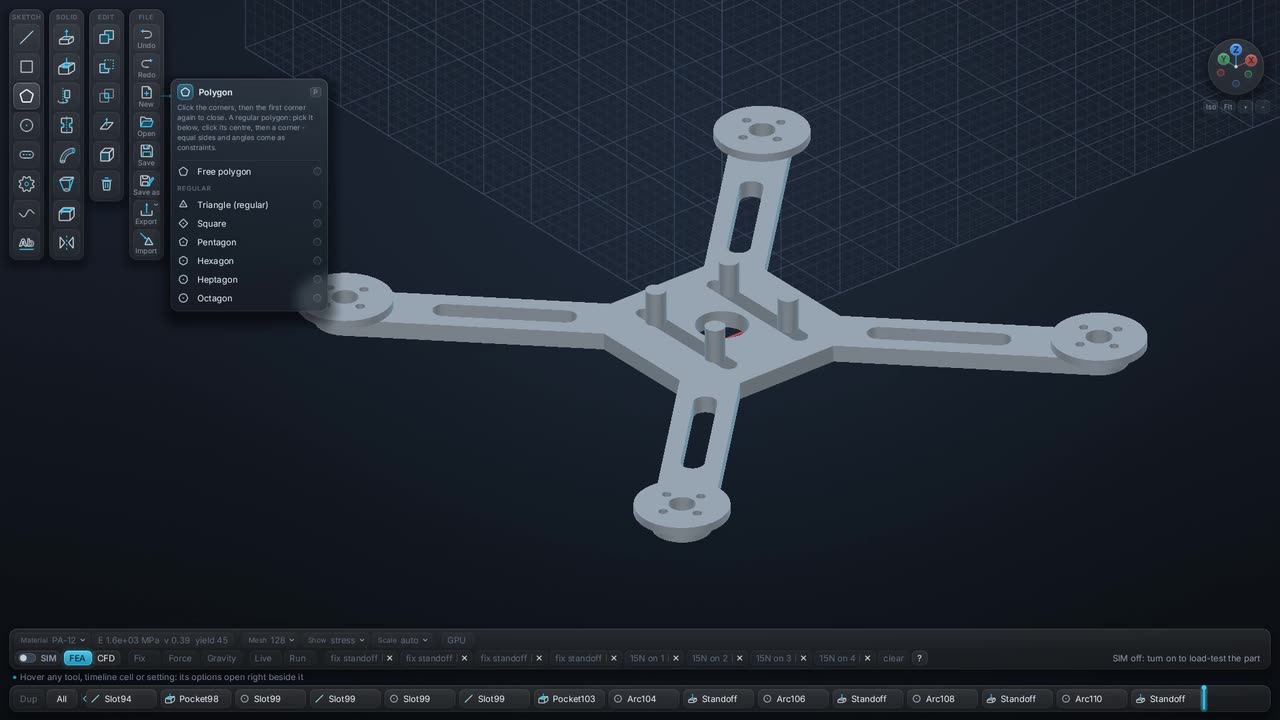
Rest the mouse on a tool, a timeline cell or a setting and its options and a one-line explanation open right beside it, with the keyboard shortcut. The status line says what to click next.
Values accept plain words and math with units: M6 10 for a tapped hole, 500 g for a load, width/2 or 2*wall + 1 mm for a size. A hint under the box shows the result as you type, or what is wrong.
Specialist tools appear when a design mode asks for them. Choose Plane and you get airfoils and wings; choose Drone and you get bolt patterns and servos. Everyone else never sees them.
Every step is a cell on the timeline. Scrub back, change a number and everything after it rebuilds. Undo and redo cover every edit, and loads and fixes follow the geometry instead of breaking.
The easiest is the one that shows you what to do next. VectorForge explains every tool on hover, accepts values in plain words, and hides specialist tools until you need them. Try it on a real part in the 14-day trial and judge for yourself.
No. You draw shapes, give them sizes and push them into 3D. Maths is there if you want it, in variables and formulas, but nothing requires it.
Yes. It works offline with no account, so there is no sign-up for a student and no cloud to manage. Each person needs their own license; contact us for classroom quantities.
It grows with you: parametric modeling, assemblies with joints and inverse kinematics, live FEA, local CFD and STEP exchange with other CAD programs are all in the same program.
Try it on your own parts
Full program for 14 days, no card and no account. After that $49.99 once, with every future version included and a 14-day money-back guarantee.